MinuteMap is a web-based mapping tool that shows how well a neighbourhood delivers on the X-minute city promise of reaching the essentials of daily life within a short walk or cycle. It was developed within DREAMS as the DREAMS Accessibility Tool (DAT), the name still used in some of the project's own deliverables, and has since been publicly released under its own name, MinuteMap.
All six DREAMS living labs are loaded into the one public instance at minutemap.online. A planner can pick the area, choose whose needs to model and see at a glance where access is already strong and where it falls short.
The tool is now public. Its source code and technical documentation are linked below.
What the tool measures
MinuteMap asks one practical question of every part of a neighbourhood, can a resident reach what they need without depending on a car? To answer it, the tool combines the local street network, the location of everyday amenities and the population living in each part of the area, then calculates travel times on foot, by cycle and, where relevant, by public transport.
Rather than checking a single destination, it looks at the whole bundle of amenities a resident draws on, from groceries and a pharmacy to a school, a café or a park. The result is an X-Min City Compliance score for every part of the area, plotted as a map that highlights well-served clusters alongside the more peripheral pockets that remain underserved, which is the pattern that tends to define urban outskirts. Because the method runs on open data, it can be applied well beyond the six living labs.
Two layers of accessibility
The tool currently works in two layers, both drawn from the DREAMS accessibility modelling framework.
Calculated accessibility (Layer 1)
Measures access to amenities using the area's real street network and a standard 15-minute benchmark. Built entirely on open data, so the same analysis can theoretically be reproduced anywhere.
Perceived accessibility (Layer 2)
Refines that picture with what residents themselves said matters, which amenities they need, how many of each and how far they will realistically travel. These choices are captured as selectable preference sets.
Why preferences matter
When the tool reflects residents' own preferences rather than a textbook 15-minute standard, access tends to look lower. People value having more than one option to choose from, and for many everyday errands they accept a shorter walk than the full 15 minutes. Choosing the right preference set is therefore central to reading a map fairly.
How the tool runs
MinuteMap calculates every result locally, in the browser. It loads a precomputed accessibility table for the area and runs the thresholds you set through DuckDB, a database engine compiled to run as WebAssembly, so nothing has to travel to a server while you explore a map. That keeps the tool fast even on a large planning area, and means the analysis runs entirely on the machine in front of you.
Running the tool
Every analysis follows the same pattern. You choose an area, decide whose needs to model, run the analysis and then read and compare the results. The walkthrough below goes through each screen in turn, using Munich as the example.
Choose an area
Select the location button at the top of the screen to open a map of Europe with a pin for every prepared area. Alongside the six DREAMS living labs it includes Munich as a whole city, a useful reference for how the gap between core and outskirts plays out at metropolitan scale. Select a pin to load that area.
Read the accessibility map
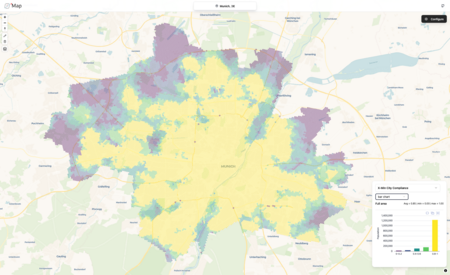
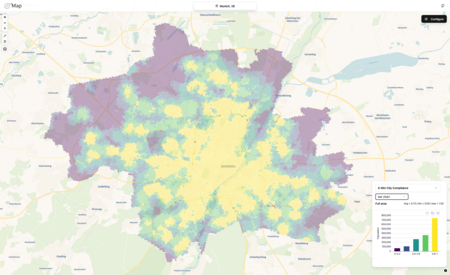
Each hexagon is a small patch of the area, coloured by its X-Min City Compliance score from purple, where few of the chosen amenities are within reach, to yellow, where nearly all of them are. The toolbar on the left zooms and reorients the map and switches its layers, while the pencil lets you outline a part of the area and the bin clears that outline again. The panel in the lower right summarises the whole area and counts how many residents fall into each band of the score. That population view matters as much as the colours, since a large purple patch at the edge may hold far fewer people than a small one near the centre.
Choose whose access to model
Select Configure at the top right to open the analysis settings. The Scenario menu sets the travel time network, with Current standing for today's network. The Preference Set menu decides whose needs the map reflects. Default is the neutral 15-minute benchmark, and each living lab has its own entry holding the preference sets drawn from its resident survey, such as the general population, migrants and older adults in Geretsried. Choosing a preset overwrites the weights and thresholds below it, and anything you change by hand afterwards is kept under Custom.
Adjust the weights
The Weights table lists the fifteen destination types MinuteMap tracks, from supermarket and pharmacy to park and playground. A weight sets how much each destination counts towards the overall score, so raising one tells the tool it matters more to the group you are modelling. In the default set every weight is one and all destinations count equally. The screenshot shows a custom distribution of weights.
Set the compliance thresholds
Compliance Thresholds define what counts as within reach. Each row groups a set of destinations and states how many of each must be reachable, by walking at 4 km/h or by cycling, and within how many minutes. Add or remove destinations with the chips on the left, delete a row with the bin and use Add Threshold to set a stricter rule for part of the bundle, for instance two supermarkets within ten minutes' walk while everything else keeps the 15-minute rule.
Run and compare
Close the settings and select run analysis to redraw the map. Running the same area twice, once with the default benchmark and once with a resident preference set, is the quickest way to see the effect described under
two layers of accessibility. In Munich the well-served core holds, while the middle ring breaks into patches and the outskirts lose further ground.
Default benchmark
Resident preference set
MinuteMap
Open minutemap.online → to run the tool for any of the six DREAMS living labs, or another area of your own. The source code and technical documentation are on GitHub.
MinuteMap was built within DREAMS, funded through the Driving Urban Transitions (DUT) Partnership. Method and living lab analyses: DREAMS Deliverable 3.1, The DREAMS Accessibility Modelling Framework for Decision Support in X-Minute City Planning (2026). Resident preferences: DREAMS Deliverable 4.2, Perceived accessibility of 15-minute neighbourhoods from residents living in the urban outskirts (2026).


