Stakeholder-based Impact Scoring (SIS) is a participatory appraisal method that shows who gains and who loses from a planned intervention. It compares one or more options with a baseline, rates how each option performs on a set of impact factors and lets every stakeholder group say how much each factor matters to them. The result is a picture of the positive and negative effects on each group, rather than a single verdict on the best option.
SIS was designed by the Mobilise research group at Vrije Universiteit Brussel, and DREAMS uses it to assess the interventions in its living labs together with the people they affect. It can be run in dedicated online software or in an Excel template, and both are covered below.
What the method measures
SIS asks one practical question of every option on the table, how would it change things for each group with a stake in it? Each option is described against a baseline, usually doing nothing or carrying on as before, on factors such as safety, noise, costs, visual appearance or air quality. The method then shows how those changes land on residents, commuters, operators, public authorities or any other group you include.
Two features set it apart from the appraisal methods planners usually reach for. Unlike cost-benefit analysis, it never has to translate effects into money, so impacts that resist pricing stay in view. Unlike most multi-criteria analysis, it does not need a full set of mutually exclusive alternatives. One option compared with the baseline is enough to produce meaningful results, which suits the outskirts, where there is often a single intervention to shape rather than several to choose between.
Two components of every score
Every result in SIS is built from two inputs, kept deliberately separate.
Performance score (objective)
How each option performs on each impact factor compared with the baseline, estimated from data, modelling or expert judgement and translated onto a common scale from minus one to plus one. It records whether an effect is positive or negative and how strong, but not how much it matters.
Stakeholder weight (subjective)
How important each impact factor is to each stakeholder, on a scale from zero to ten. A factor that does not concern a group simply receives a weight of zero, so one shared list of factors can serve every group.
Multiplying the two gives an impact score for each stakeholder, which can be read separately for positive and negative effects, for one group or for several combined.
A dashboard, not a ranking
Because every score combines an objective and a subjective part, SIS does not name a single best solution. Its value lies in showing where the burdens fall. A group that carries a disproportionate share of the negative effects is the signal to redesign, mitigate or compensate while the intervention can still change. The scores can be updated at any time as new information comes in, so the same assessment can accompany a project from first idea to delivery.
Software or Excel template
The method works the same way in both versions. The choice comes down to speed against flexibility.
SIS software
The faster and simpler route. After signing up at crispa-sis.eu, choose SIS on the start screen and add a new project, giving it a name, an optional goal and the granularity of the performance scale. The software can also send the weighting survey to stakeholders by email.
Excel template
The more flexible route, with more room to customise the calculations and the charts. The template guides you tab by tab and opens with a short tutorial. Macros have to be enabled for it to work. It holds up to five options, ten stakeholder groups and twenty impact factors, and can split each group into individual representatives.
Running an assessment
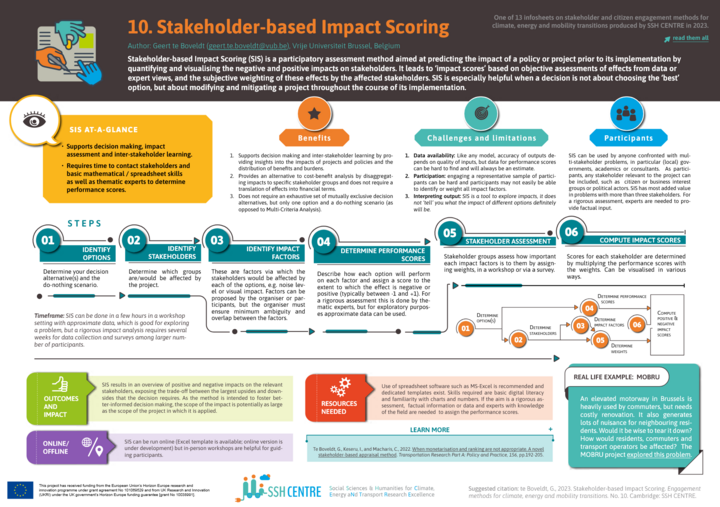
Every assessment follows the same six steps, whichever version you use. The planning team usually prepares the first four, stakeholders give their weights in the fifth and the last brings the two together.
Formulate the problem and the options
Describe the interventions you want to assess as precisely as you can. You can assess one option or several, and they do not have to exclude one another. What every assessment needs is a baseline, the do-nothing or business-as-usual scenario that each option is measured against. The options can be set by the decision makers or come out of a co-creative process with stakeholders. Enter their names in the software or template.
Identify the stakeholders
List the individuals and groups who are likely to benefit or suffer from the options. Some are included for practical reasons, because the project needs their support to succeed, and others for moral ones, because the fair distribution of benefits and burdens matters. Their main role comes in the weighting step, through workshops, interviews or a survey. For groups too large to hear everyone individually, such as all residents of a neighbourhood, both versions can average the weights of the members of a group. If you want a deeper level of participation, stakeholders can also be consulted on the other steps, although there is no fixed procedure for that.
Define the impact factors
Draw up the factors on which the options can be described and compared, and enter them under the impact factors tab. Each should be relevant and unambiguous, and it should be possible to estimate how the options perform on it. Cover the uncomfortable effects as well as the welcome ones, and make every stakeholder's perspective visible, for instance by naming who would bear a cost rather than listing costs in general. The tests used when
choosing the plan's indicators apply here too, above all keeping the set small and free of overlap so that no effect is counted twice.
Rate each option's performance
Rate every option on every factor as neutrally as possible. First describe the effect from existing data, model outputs or expert input, for example the change in carbon emissions an option is expected to bring each year. These descriptions do not change the result but record the reasoning behind it. Then translate each effect onto the common scale, by default seven points from minus one for the most negative to plus one for the most positive, always relative to the baseline. Expert judgement is the easiest basis for this. It is never fully objective, and stakeholders can be consulted, although they often find it hard to rate effects in this form.
Collect the stakeholder weights
Each stakeholder gives every factor a weight from zero, not important, to ten, most important. A good way in is to pick the most important factor first and rate the others against it. Several factors can share a weight, and no factor has to reach ten. Weights can be gathered through surveys, interviews or workshops. When you send a survey, include everything respondents need to know about the project, since they can only weigh what they understand.
Calculate and read the results
The tool multiplies each performance score by the matching weight and adds the results up into impact scores, split into positive and negative effects, per stakeholder or across several. Use them to compare options or to take one option apart factor by factor. Look first for any group that is disproportionately worse off, because that is where mitigation or compensation is needed. Revisit the scores as the project develops and new evidence comes in.
Sources and further information
DREAMS Deliverable 6.1: the SIS manual by te Boveldt (Appendix V) and the role of SIS in evaluating the living lab interventions.