Stakeholder-based Impact Scoring: Difference between revisions
No edit summary |
No edit summary |
||
| Line 87: | Line 87: | ||
[https://www.crispa-sis.eu Open the SIS software →] to set up an assessment of your own. The full manual, covering both the software and the Excel template, is included as an appendix to [[Publications/6|DREAMS Deliverable 6.1]], and the method and its first application are published in [https://doi.org/10.1016/j.tra.2021.12.004 te Boveldt et al. (2022)]. | [https://www.crispa-sis.eu Open the SIS software →] to set up an assessment of your own. The full manual, covering both the software and the Excel template, is included as an appendix to [[Publications/6|DREAMS Deliverable 6.1]], and the method and its first application are published in [https://doi.org/10.1016/j.tra.2021.12.004 te Boveldt et al. (2022)]. | ||
</div> | </div> | ||
<div class="dreams-callout"> | |||
<div class="dreams-callout__label">Contact</div> | |||
'''Name:''' Charlotte van Vessem<br> | |||
'''Institution:''' Vrije Universiteit Brussel<br> | |||
'''Email:''' [mailto:charlotte.van.vessem@vub.be charlotte.van.vessem@vub.be] | |||
</div> | |||
<div class="sump-sources"> | <div class="sump-sources"> | ||
Latest revision as of 10:28, 10 November 2026
Stakeholder-based Impact Scoring (SIS) is a participatory appraisal method that shows who gains and who loses from a planned intervention. It compares one or more options with a baseline, rates how each option performs on a set of impact factors and lets every stakeholder group say how much each factor matters to them. The result is a picture of the positive and negative effects on each group, rather than a single verdict on the best option.
SIS was designed by the Mobilise research group at Vrije Universiteit Brussel, and DREAMS uses it to assess the interventions in its living labs together with the people they affect. It can be run in dedicated online software or in an Excel template, and both are covered below.
What the method measures
SIS asks one practical question of every option on the table, how would it change things for each group with a stake in it? Each option is described against a baseline, usually doing nothing or carrying on as before, on factors such as safety, noise, costs, visual appearance or air quality. The method then shows how those changes land on residents, commuters, operators, public authorities or any other group you include.
Two features set it apart from the appraisal methods planners usually reach for. Unlike cost-benefit analysis, it never has to translate effects into money, so impacts that resist pricing stay in view. Unlike most multi-criteria analysis, it does not need a full set of mutually exclusive alternatives. One option compared with the baseline is enough to produce meaningful results, which suits the outskirts, where there is often a single intervention to shape rather than several to choose between.
Two components of every score
Every result in SIS is built from two inputs, kept deliberately separate.
Multiplying the two gives an impact score for each stakeholder, which can be read separately for positive and negative effects, for one group or for several combined.
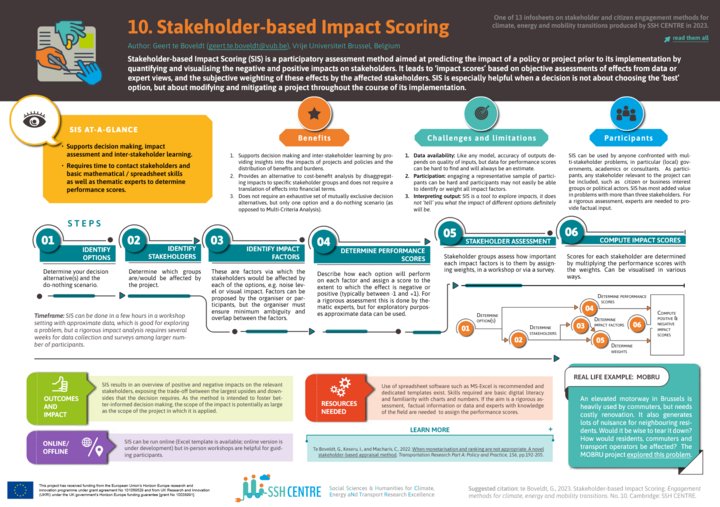
Because every score combines an objective and a subjective part, SIS does not name a single best solution. Its value lies in showing where the burdens fall. A group that carries a disproportionate share of the negative effects is the signal to redesign, mitigate or compensate while the intervention can still change. The scores can be updated at any time as new information comes in, so the same assessment can accompany a project from first idea to delivery.
Software or Excel template
The method works the same way in both versions. The choice comes down to speed against flexibility.
The faster and simpler route. After signing up at crispa-sis.eu, choose SIS on the start screen and add a new project, giving it a name, an optional goal and the granularity of the performance scale. The software can also send the weighting survey to stakeholders by email.
The more flexible route, with more room to customise the calculations and the charts. The template guides you tab by tab and opens with a short tutorial. Macros have to be enabled for it to work. It holds up to five options, ten stakeholder groups and twenty impact factors, and can split each group into individual representatives.
Running an assessment
Every assessment follows the same six steps, whichever version you use. The planning team usually prepares the first four, stakeholders give their weights in the fifth and the last brings the two together.
Open the SIS software → to set up an assessment of your own. The full manual, covering both the software and the Excel template, is included as an appendix to DREAMS Deliverable 6.1, and the method and its first application are published in te Boveldt et al. (2022).
Name: Charlotte van Vessem
Institution: Vrije Universiteit Brussel
Email: charlotte.van.vessem@vub.be